


HiNoter - AI Note Taker
4.776.00 Reviews
App Specs
- Version
- 4.8.0
- Updated On
- License
- Free
- Downloads
- 1,000,000+
- Developer
- Nieruo Team
- Categories
- Productivity
- Platform
- Android
Screenshots
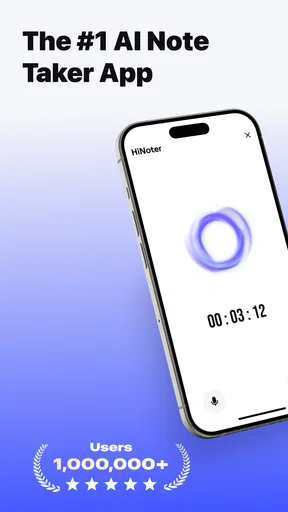
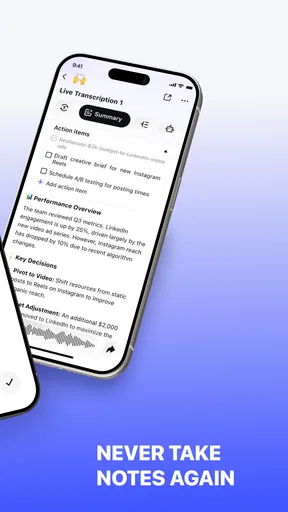
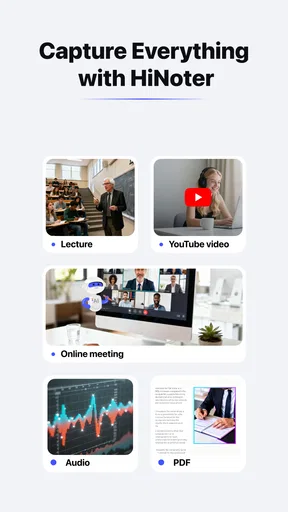
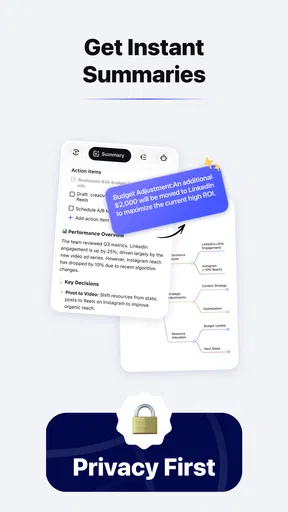
 Analysis by AppCompare
I judge a meeting-notes app less by how clever its AI sounds than by whether I can turn a conversation into useful work afterward. That is the problem HiNoter - AI Note Taker is meant to tackle: capturing spoken discussion, then helping shape it into a summary and follow-up items. For me, the important question is whether that handoff fits a dependable routine, rather than leaving me with one more pile of notes to sort through.
Decide what you need before pressing record
Automatic transcription is most valuable when I know what I want to retrieve later. Before a meeting, I’d write down its purpose and the decisions or questions I need to track. That small step gives me a useful yardstick for checking a transcript and summary: did the app preserve the decision, the owner, and the next step, or merely capture the general topic?
This is also where I’d set expectations. A transcript can save me from trying to write every sentence, but it shouldn’t become the authority on what people agreed to do. Names, specialist terms, interruptions, and overlapping voices can all make automated text harder to interpret. I treat the result as a draft record to review, especially before forwarding action items or relying on them for a deadline.
In practical terms, HiNoter is a productivity app from Nieruo Team, built around meeting transcription, summaries, and action items. It is free to install, while optional in-app purchases range from $2.99 to $99.99 per item. Its Everyone age rating makes it broadly accessible, but anyone planning to record a work or school conversation should still follow the rules and expectations that apply to that setting.
Capture the conversation, then make the notes findable
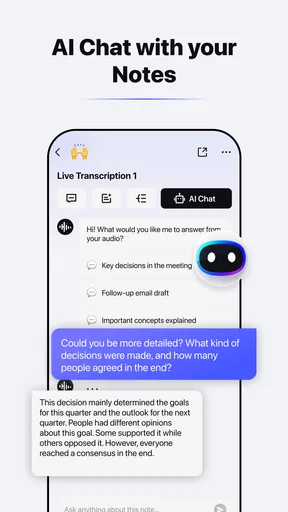
The strongest reason to try HiNoter is the path from spoken discussion to a written account you can revisit. Instead of dividing my attention between listening and typing, I can focus on the conversation and use the resulting text as a starting point. The summary is useful for a quick refresh; the detailed transcript is the better place to check exactly what was said when a point matters.
I wouldn’t let the summary replace the source. A short recap can make a meeting easier to scan, but compression can blur caveats or make a tentative idea sound settled. My practical habit would be to check each proposed action against the transcript, then rewrite it in plain language with a clear task and owner where that information was actually agreed. If a name or commitment is ambiguous, I’d confirm it with the people involved rather than guess.
Organization matters just as much as capture. A transcript titled only with a generic meeting label is difficult to distinguish from another one later, so I’d use a consistent naming pattern that includes the project or recurring meeting and its date. I’d also keep a separate, short list of decisions that need to survive beyond the full transcript. That makes the app part of a system: HiNoter helps preserve the conversation, while a deliberately maintained task list keeps the work moving.
Worth Reading Before You Choose

EA SPORTS FC Mobile 26 Is a Bigger Football Game, but It Takes Time

Flipboard Shows What News Apps Must Do Beyond the Feed

Switching to Android Auto Means Rethinking Your Driving Routine

Google Calendar Makes a Crowded Week Easier to Manage

Ludo King Makes the Most of the Minutes Between Plans

Baby Panda World Brings Quick Play to Modern Phones, but Its Game Library Feels Busy
How HiNoter fits into a repeatable productivity routine
A realistic routine might start with a weekly project check-in. Before it begins, I note the questions that need answers. During the discussion, I concentrate on listening rather than trying to produce a perfect live record. Afterward, I scan the summary, verify the action items against the transcript, and transfer only the commitments I’m responsible for into the place where I already manage my tasks. I can then return to the meeting record if a decision needs context.
That last step is important: a transcript is not automatically a task-management system. If I leave every follow-up buried in meeting notes, I can still miss it. I’d use HiNoter to reduce the cost of capturing and reviewing a discussion, not to replace calendar reminders, project boards, or a personal to-do list that I already trust. The best workflow is the one that gives each tool a clear job.
For recurring conversations, consistency pays off. I’d review notes soon after each meeting while the discussion is fresh, correct any obvious errors, and give unresolved points a visible status in my own workflow. That makes it easier to distinguish a final decision from an idea that still needs approval. It also prevents a polished-looking AI summary from becoming misleading simply because nobody checked it.
Where automated notes can fall short
Recording is not the right default for every conversation. Sensitive topics, private one-to-ones, or meetings where participants are uncomfortable being recorded call for a different approach, such as handwritten notes or a brief manual recap. I’d explain the purpose of recording and follow the relevant workplace, school, and local requirements before using any transcription tool. Convenience does not outweigh trust.
Audio conditions can also affect how useful the result is. A quiet room with one person speaking at a time is an easier situation for transcription than a noisy space with people talking over one another. Technical vocabulary, unfamiliar names, and quick changes of speaker deserve a careful read-through. If accuracy is critical, I would not rely on an automated transcript without checking the parts that support a decision.
There is a practical trade-off between detail and speed, too. A full transcript is helpful when I need to inspect wording, but it can be cumbersome for a quick status update. A summary is faster to read, yet may omit the reasoning I need later. I’d choose which layer to consult based on the job: recap for orientation, transcript for verification, and a separate action list for execution.
Who will get the most from it
HiNoter makes the most sense for people who regularly leave meetings with several details to remember: students reviewing group discussions, freelancers coordinating client work, or colleagues tracking decisions across projects. It can be especially useful when I need to stay engaged in a conversation instead of splitting my attention between listening and writing. If my meetings are rare, short, or already documented well, the extra recording-and-review step may not be worth adding.
Compared with ordinary note-taking apps, its appeal is the focus on turning speech into a transcript and a more digestible record. A blank notes page gives me more control and may be better for selective, private, or highly structured notes, but I have to do the writing myself. A calendar or task manager is stronger for scheduling and tracking work over time; it does not, by itself, preserve the substance of a discussion. HiNoter fits between those tools rather than replacing them.
It is also worth considering how you prefer to work. If you want to decide exactly what goes into your notes and avoid reviewing long transcripts, manual notes may be the cleaner choice. If you often need to revisit what was discussed and are willing to verify AI-generated text, automated capture can save effort. I’d start with one ordinary, low-sensitivity meeting and see whether the transcript and summary genuinely reduce follow-up work before making it part of every conversation.
Getting Started with HiNoter
First things first, installing HiNoter is a straightforward affair. Available on both Android and iOS, it’s just a quick download from the respective app stores. Once installed, the app welcomes you with a sleek and intuitive interface. It’s minimalistic, yet it packs a punch with its features. No need to fumble around; everything is right where you’d expect it to be.
One of the coolest things about HiNoter is its AI-powered capabilities. As soon as you start typing, the app's AI kicks in, offering suggestions and predictions that make note-taking faster and more efficient. Whether you’re jotting down thoughts for a big project or simply listing your grocery items, HiNoter has your back.
Features That Shine
So, what makes HiNoter a cut above the rest? Let’s break it down:
- AI-Powered Suggestions: This isn’t just a gimmick; the AI learns from your writing style and preferences, offering tailored suggestions that genuinely help speed up note-taking.
- Cross-Platform Sync: Seamlessly sync your notes across devices. Start a note on your phone and finish it on your tablet or computer without missing a beat.
- Voice Note Capabilities: For those moments when typing just isn’t an option, HiNoter’s voice note feature is a lifesaver. The speech-to-text function is surprisingly accurate and makes capturing thoughts on the go effortless.
- Organizational Tools: With tags, folders, and search functions, finding that one note you wrote three weeks ago is as easy as pie.
Everyday Use and Practicality
In terms of everyday use, HiNoter is a joy. The app’s design doesn’t just look good; it feels good, too. I particularly love how the app encourages productivity without overwhelming you with unnecessary features. It’s all about efficiency.
One day, I found myself in a lengthy meeting, and instead of scribbling furiously on a notepad, I relied on HiNoter. Not only did it help me keep track of the discussion points, but the AI suggestions even helped me capture follow-up tasks swiftly. It was like having a personal assistant in my pocket.
Security and Privacy
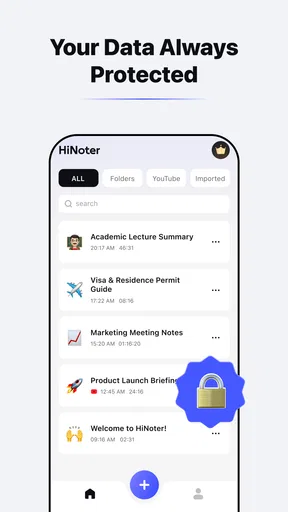
We can’t talk about note-taking apps without touching on security. I was pleased to discover that HiNoter takes privacy seriously. Your notes are encrypted, and you have the option to add an extra layer of security with a password or biometric authentication. In today’s digital age, this peace of mind is invaluable.
Final Thoughts
All in all, HiNoter - AI Note Taker is more than just another app on my phone; it’s a tool that genuinely enhances my productivity and organization. Whether you’re a student, a professional, or just someone who loves staying organized, HiNoter has something for everyone. It's definitely worth a try if you’re looking to simplify your note-taking process with a touch of AI magic.
There is a reason it has earned a 4.7 average from around 6,600 ratings, though I’d treat popularity as a useful signal rather than proof that it suits every workflow. The app has passed 100,000 installs, is free to start, and its current version is 3.3.1. It was released on June 30, 2025, and requires Android 8.0 or later. Those details make it easier to judge whether it fits your device and expectations, but the everyday test remains whether you’ll actually review and use the notes it creates.
My main reservation is that an AI-produced record can look finished before it has been checked. A neat summary is still only helpful if it preserves the important qualifications and does not turn uncertainty into a firm commitment. I’d use the transcript as a reference, edit or confirm consequential details, and avoid treating an automatically identified action as assigned unless the meeting made that clear. That extra review is a small cost, but it is part of using meeting automation responsibly.
For anyone asking whether it can replace a normal notes app, I’d say only for the meeting-capture part of the job. It is a more natural fit when spoken discussion is the material you need to retain; for quick personal reminders, structured research notes, or a task list you actively manage, a conventional notes or planning tool may remain simpler. Likewise, someone who prefers not to record conversations should skip the transcription workflow and write a concise recap instead.
So, if you're ready to take your note-taking game to the next level, go ahead and give HiNoter a spin. You might just find it’s exactly what you’ve been missing in your digital toolbox.
Pros
- AI-driven note organization saves time.
- User-friendly interface for quick navigation.
- Voice-to-text feature is highly accurate.
- Syncs seamlessly across all devices.
- Customizable themes enhance user experience.
Cons
- Limited free version functionality.
- Occasional syncing delays reported.
- Requires stable internet for optimal use.
- Some features locked behind paywall.
- Support response can be slow.
FAQs for HiNoter - AI Note Taker
What is HiNoter - AI Note Taker and how does it work?
HiNoter - AI Note Taker is a cutting-edge app designed to simplify your note-taking experience by leveraging artificial intelligence. It transcribes voice notes into text, organizes them, and offers smart suggestions for categorizing and prioritizing your notes. The app's intuitive interface ensures that capturing and retrieving information is seamless and efficient.
Is HiNoter available on both Android and iOS platforms?
Yes, HiNoter is available for download on both Android and iOS platforms. Users can find it on the Google Play Store for Android devices and the Apple App Store for iOS devices. The app is optimized for both operating systems, ensuring a smooth user experience regardless of your device.
Does HiNoter require an internet connection to function?
While HiNoter can perform basic functions offline, such as organizing existing notes, an internet connection is necessary for full functionality. Features like AI-powered transcription and cloud syncing require internet access to ensure that your notes are accurately transcribed and securely backed up.
How secure is my data on HiNoter?
HiNoter prioritizes user privacy and data security. The app uses end-to-end encryption to protect your notes and personal information. Additionally, it offers options for local storage or secure cloud backup, allowing users to choose their preferred level of data security and accessibility.
Are there any subscription fees or in-app purchases in HiNoter?
HiNoter offers a free version with basic features, but for access to premium features like advanced AI capabilities and additional storage, users can opt for a subscription. The app provides several pricing tiers to suit different needs, ensuring flexibility for both casual and professional users.


